
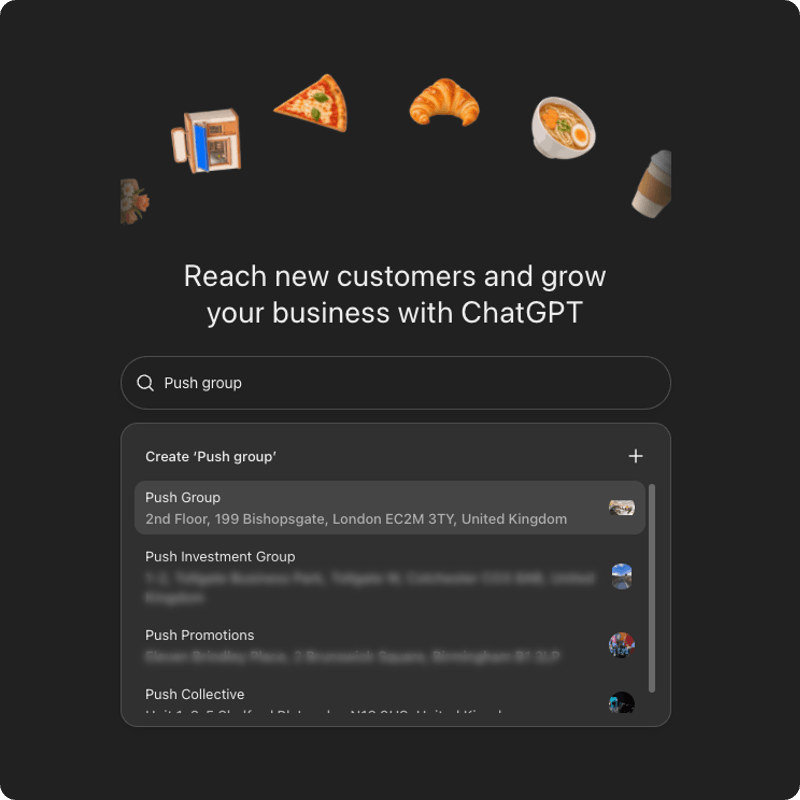
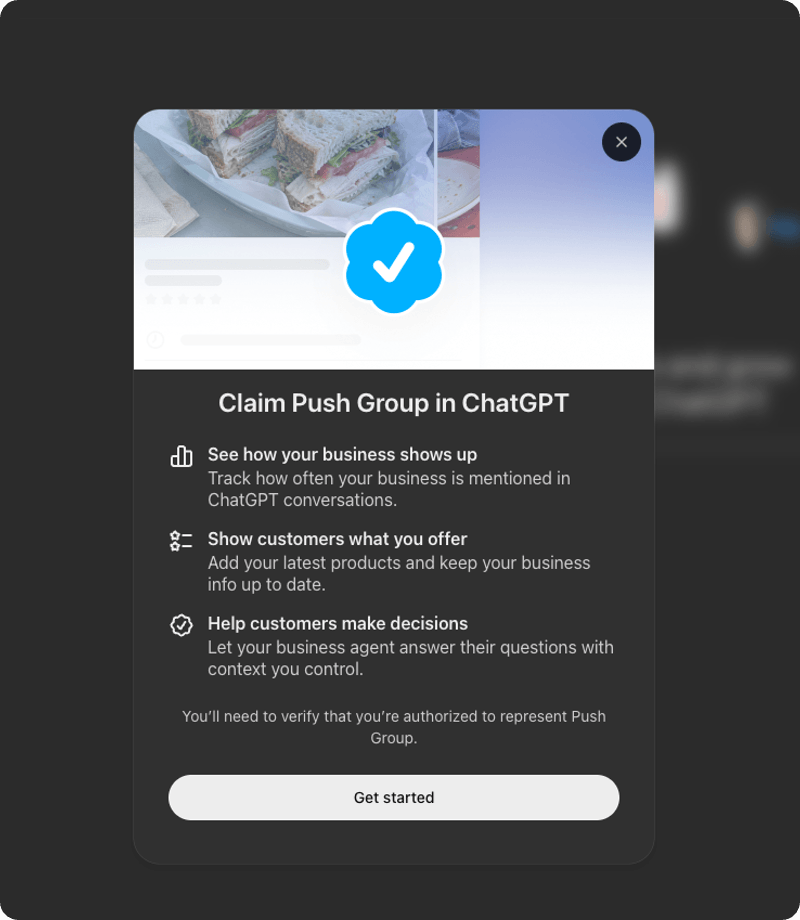
We picked ours and pressed Get started. ChatGPT told us we need to verify we are authorised to represent the business, then put us on a waitlist. We are still in that queue.
OpenAI launched Businesses in ChatGPT in beta this month. Once you are verified, Business Hub shows how often ChatGPT references your site and how many clicks it sends you. Until then, you have no OpenAI data on either. The queue is open and the preparation is yours.
Key Takeaways
- Business Hub is OpenAI's tool for claiming your business in ChatGPT, keeping its details current and seeing how people engage with it. Think Google Business Profile, for ChatGPT.
- Claiming takes two approvals. OpenAI approves the claim, then an identity check with Persona unlocks edits, product feeds and the traffic insights.
- Access opens gradually. Starting a claim now puts you on a waitlist, and OpenAI has not published a wait time.
- Claiming gives ChatGPT accurate details to draw on. OpenAI says it does not guarantee higher visibility.
- Record your ChatGPT traffic in GA4 today. That is your baseline for every comparison later.
What is ChatGPT Business Hub?
ChatGPT Business Hub is OpenAI's dashboard for claiming your business in ChatGPT, managing the details it holds about you and viewing insights on how people engage with you. You open it from the ChatGPT sidebar or at chatgpt.com/business-hub.
OpenAI launched it in beta on 10 November; OpenAI says 1.2 billion people use ChatGPT every week.
Business Hub does three jobs, according to OpenAI's Help Center:
- You update your website, description, category, logo, delivery policy and return policy.
- Retailers share prices and availability through a product feed, by CSV or a Shopify connection.
- You see mentions, website clicks and discovery topics.
The Google Business Profile comparison holds up. The metrics have their own definitions, and we cover those below.
Why should businesses claim their business in ChatGPT?
Claiming lets you give ChatGPT accurate details about your business and gives you OpenAI's own data on how it mentions you. Without a claim, ChatGPT works from whatever it finds about you elsewhere.
That matters most for the boring facts. A wrong return policy or an out-of-date price in an AI answer costs you a sale you never see.
The data is the second reason. No other source tells you how often ChatGPT references your site or how many clicks it sends you. OpenAI holds that number.
I like this launch for a simple reason. It hands a mid-sized business the same dashboard as a global brand. OpenAI says you don't need an Ads account or a ChatGPT Enterprise agreement to claim an eligible business. For the businesses we work with across retail, travel and B2B, that levels the starting line. Our AI marketing work starts from the same idea.
Who can claim a business in ChatGPT, and does it work in the UK?
You can claim a business if you own it or are authorised to represent it, in places where ChatGPT is available and verification is supported. OpenAI's Help Center says availability depends on your location and business type.
For the UK, here is what we know first-hand. We are a UK business, and ChatGPT already held our London listing. We found it, started a claim and joined the waitlist. We have not been through verification yet, so we cannot report on how that step works for a UK business.
OpenAI's Help Center sets two limits. Local stores and restaurants can currently claim only an existing US listing, while eligible online businesses can add a listing. If you run a UK shop or restaurant, search Business Hub for your listing before you plan around it. Each brand is also managed separately, so claiming a main brand does not claim its locations.
Claim under a business account, not an agency one. The admin who claims can add teammates and give an agency access afterwards.
How do you claim your business in ChatGPT, step by step?
Search for your business in Business Hub, pick the matching listing, press Get started, wait for OpenAI to open access, verify, then complete an identity check with Persona. Each stage is a separate approval.
- Sign in at chatgpt.com/business-hub with a ChatGPT account on a shared work inbox such as marketing@. Access should not sit with one person.
- Search for your business and pick your listing. Our search returned several similarly named listings, so we checked the address before choosing the London entry.
- Press Get started. ChatGPT shows what claiming gives you and tells you to verify you are authorised to represent the business.
- Join the waitlist. OpenAI is letting businesses in gradually, and it emails you when you can continue.
- Verify your connection. OpenAI offers a code to your business phone (text or call), a code to your business email, a DNS TXT record on your domain or a Shopify connection. OpenAI reviews the claim and emails its decision.
- Complete identity verification with Persona. Expect to provide a government-issued ID, business registration information and proof you are authorised to represent the business.
- Get the blue check. Claiming alone gives no verified badge. It appears once Persona approves you.
If someone else manages your domain, send them the TXT record exactly as ChatGPT shows it. One wrong character stops verification.
Persona approval is the real gate. OpenAI's Help Center says you cannot publish changes, connect a product feed or view insights until it is approved.
What do Business Hub insights actually show?
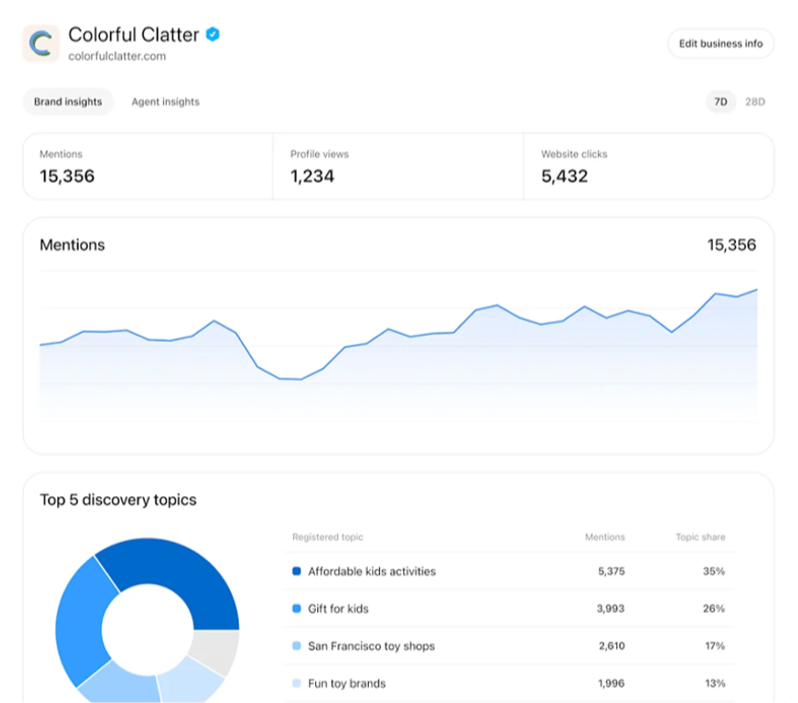
Insights show aggregate activity over the past 28 days: mentions, website clicks and discovery topics. They unlock only after your claim and Persona verification are approved.
Mentions
For an online business, a mention counts when ChatGPT references your website. The brand name alone does not count. That makes the number narrower than "how often ChatGPT talks about us".
Website clicks
This counts how often people click through from ChatGPT to your website.
Discovery topics
Discovery topics group the themes in ChatGPT answers that mentioned or cited your business. They are aggregate categories. OpenAI does not show you individual prompts, customer conversations or competitor data.
Read the topics for gaps. Any subject you expect to see and don't is a content problem you can work on.
OpenAI says counts can be incomplete and a blank metric does not mean zero activity. A blank can mean you have not reached the reporting threshold yet.
How do you track ChatGPT traffic in GA4?
Filter Session source / medium in GA4 to sources matching "chatgpt" or "openai", exclude paid rows, and record sessions plus revenue or key events. That is your baseline.
In GA4, go to Reports, then Acquisition, then Traffic acquisition. Set your date range and a comparison with the same period last year. Add a filter on Session source / medium, choose "matches regex" and enter:
.*(chatgpt|openai).*
In 2026 GA4 has labelled ChatGPT visits as ai-assistant, referral, feed and (not set). Check every row. A short list misses visits and makes growth look bigger than it is.
Leave out any row whose medium is cpc or paid. Take the total from the totals row, because GA4 estimates sessions and monthly figures will not add up to the period total.
If last year's figure is tiny, quote the raw counts and skip the percentage. Growth from 6 sessions to 30 sounds dramatic and tells you nothing.
GA4 is your view and Business Hub is OpenAI's view. When both are live, compare them.
What should retailers do before Black Friday and Cyber Monday?
Join the waitlist now, get your product feed ready with sale prices and stock, and plan for changes to take time to appear. Black Friday is 27 November and Cyber Monday is 30 November, and OpenAI has not said whether you will be verified by then.
Review time varies and OpenAI has not published a wait time. Preparation means nothing waits on you when access opens.
- Join the waitlist. It takes two minutes, on a shared work inbox.
- Prepare your feed. OpenAI accepts a CSV that follows its product feed specification, or a Shopify connection from Business Hub or the Shopify admin. Correct prices, stock and descriptions first.
- Plan sale prices in advance. OpenAI reviews and publishes changes, and updates take time to appear in a listing or answer. Do not rely on a same-day price change showing up.
- Match your details everywhere. Name, address, phone, opening hours and website should read the same on every listing.
- Record your GA4 baseline. You need it for the sale weeks.
A connected feed does not publish an agent or guarantee that ChatGPT recommends your products. It gives ChatGPT current prices and availability to draw on.
What is a Business Agent, and can UK businesses use one?
A Business Agent is a chat assistant customers talk to inside ChatGPT, answering questions from information you provide. It is available to eligible ecommerce and online service businesses in the US with a website, so UK businesses cannot build one yet.
The agent sits in a clearly labelled chat, separate from ChatGPT's independent answers. It explains products and policies and links to your website. It cannot complete purchases, make bookings or check a customer's order.
Publishing is its own step. After Persona approval you review your agent and press Publish. Claiming your business does not publish one.
Does claiming your business make ChatGPT recommend you?
No. OpenAI says claiming does not guarantee increased visibility and does not give you control over ChatGPT's independent recommendations. Advertising does not influence those answers either.
Claiming gets your facts straight. ChatGPT still decides who to name, using what it reads about you across the web: your pages, your reviews and who else talks about you.
That is the work of generative engine optimisation: content structure, schema markup, entity data and the authority signals AI tools read. If you are choosing a partner for it, our guide to the top GEO agencies in the UK sets out the field.
FAQs about ChatGPT Business Hub?
What is ChatGPT Business Hub?
ChatGPT Business Hub is OpenAI's dashboard for claiming your business in ChatGPT, keeping its details up to date and viewing insights on mentions, website clicks and discovery topics. Retailers can also connect a product feed with prices and availability.
Do I need to pay or advertise to claim my business in ChatGPT?
No. OpenAI says you do not need an Ads account or a ChatGPT Enterprise agreement to claim an eligible business. Claiming, publishing a Business Agent and advertising are separate, and advertising does not influence ChatGPT's independent answers.
Can UK businesses claim their business in ChatGPT?
Eligible businesses where ChatGPT is available and verification is supported can claim. Availability depends on location and business type. PUSH, a UK business, found its London listing and joined the waitlist on 13 November. Business Agents are US-only for now, and local stores and restaurants can currently claim only an existing US listing.
How do you verify your business in ChatGPT?
After OpenAI opens access, you verify by business phone code, business email code, a DNS TXT record on your domain or a Shopify connection. OpenAI reviews the claim. You then complete identity verification with Persona to publish changes, connect a feed and view insights.
Does claiming my business make ChatGPT recommend it?
No. OpenAI says claiming lets you manage the information you provide but does not guarantee increased visibility or give you direct control over ChatGPT's independent recommendations. ChatGPT also draws on other sources about your business.
How can PUSH help you prepare for ChatGPT?
PUSH works with mid-sized UK businesses on AI search visibility, and won Best Use of AI in Search at the UK Search Awards 2025.
We can start your Business Hub claim on the right account, build your GA4 baseline and check your product feed before the sale weeks. We can also show you where ChatGPT names you and where it names a competitor instead.
Request a free GEO audit and we will show you how many visits ChatGPT sends you today, how it talks about your brand against your competitors, and what to fix first.
Open GA4 tonight and write down the number. Everything OpenAI shows you later gets measured against it.